For Instagram Reels, TikTok and YouTube Shorts

Check your video before you post it.

Post Metras finds text hidden under the app’s buttons, mistakes on screen, other apps’ watermarks, weak audio and caption errors. Before anyone sees them.

No sign-up · Your video is never uploaded

Result for each app

  • Reels
  • TikTok
  • Shorts

The problem

The mistake only shows after you post.

In your editing app everything looks right. In the platform’s app, your video is covered by buttons, captions and menus. Four cases anyone who posts often knows.

  1. The key line under the like button

    You put the closing line of the video at the bottom right. On a phone it is covered by the like, comment and share buttons, and nobody can read it.

  2. Thousands see the mistake

    A typo in a subtitle stays in the video for as long as it lives, and often ends up as a comment underneath. Once you spot it, all you can do is upload again.

  3. Another app’s watermark

    A video exported from CapCut or TikTok with their logo in the corner: Instagram and YouTube may show it to fewer people.

  4. It can’t be fixed after posting

    On TikTok you can’t edit a video once it is posted, and on Reels auto-generated captions may not be correctable after upload. Whatever you want to change, change it before.

Features

Every check, with its reason.

Thirteen things Post Metras does. For each one: what it checks, how, and what you gain. In the samples on the right you can try the logic yourself.

01Free

Each app’s safe zones

What it checks
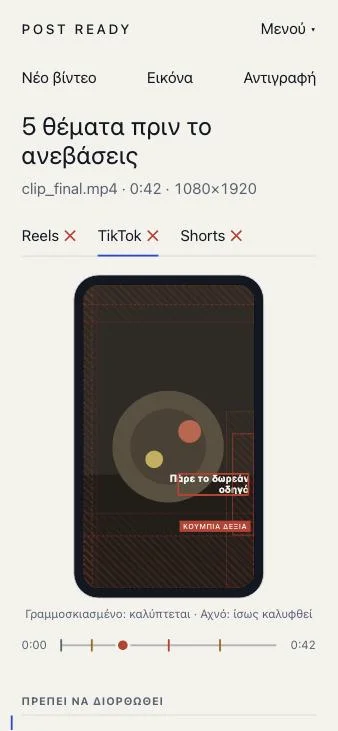
Whether on-screen text falls under the top bar, the buttons on the right, or the area of the app’s username and caption.
How
Each platform has its own zones, measured on a 1080×1920 canvas from published guides. The text read from the image is compared with the core area (“covered”) and with the wider, conservative zone (“may be covered”).
What you gain
You see which word gets lost and in which app, on a phone preview, before your audience does.
Get the free guide
  • Covered
  • May be covered

Move the caption with your finger, the mouse or the up and down arrow keys.
02Free

On-screen spelling

What it checks
Mistakes inside subtitles and video text, in 18 languages. Text is read in 19 languages; Finnish has no spelling check.
How
The text is read from the image (OCR) and checked with Hunspell, the same spelling engine LibreOffice and Firefox use. English is built in. The other languages download once and then work offline. Capitalized and ALL-CAPS words are treated as names, and @handles and hashtags are skipped, so they are not flagged.
What you gain
The mistake doesn’t leave with the video. Anything that is correct but missing from the dictionary can be added to your personal dictionary and won’t be flagged again.

What is flagged and what is not

  • recieve misspelled
  • FREE GUIDE all-caps words are treated as names
  • Anna name
  • @anna_fit handle
  • postmetras unknown word, you can add it

Languages 19

  • Ελληνικά
  • English
  • Español
  • Português
  • Français
  • Deutsch
  • Italiano
  • Nederlands
  • Polski
  • Română
  • Čeština
  • Magyar
  • Svenska
  • Türkçe
  • Українська
  • Bahasa Indonesia
  • Dansk
  • Norsk bokmål
  • Suomi (no spelling)

03Free

Readability

What it checks
Letters too small for a phone, low contrast against the background, and text that disappears before you can read it.
How
The height of the words is measured against the frame (under 2.2% is hard to read), the contrast between text and background (2.5:1 or more is good) and how many words appear per second (over 3.5 is fast).
What you gain
The text you add reads at a glance on a phone, and viewers don’t have to pause.

See how

% of the frame

Text colour

Contrast with the background :1

words per second

04Free

TikTok and CapCut watermarks

What it checks
Whether the name or end card of TikTok or CapCut is visible in the picture.
How
The same OCR looks for the app’s name near the edges of the frame, or in an end card in the last seconds, together with the @handle that comes with it.
What you gain
Instagram and YouTube may show videos with another app’s watermark less often. You find out before you post, not when the reach drops.
TikTok@creator_name
Made with CapCut

Found: TikTok

  • Reelsmay show the video less often
  • Shortsmay show the video less often

05Free

Audio

What it checks
Loudness in LUFS, peaks, and silence at the start.
How
Loudness is measured as integrated loudness according to ITU-R BS.1770. The target is about −14 LUFS (acceptable from −20 to −9) with peaks below −1 dB. This is guidance for social media, not a platform requirement. If there is no audio, or it starts after about a second of silence, you see it.
What you gain
Audio that is neither a whisper nor squashed. Viewers hear it clearly without touching their phone’s volume.

LUFS

06Free

Technical quality

What it checks
HDR files, odd or variable frame rate, audio that ends before the video, very low bitrate, silent gaps, sudden loudness jumps, flashing, and codecs that get re-encoded anyway.
How
The file’s own details are read without decoding it (with the open-source mediabunny library), and the audio and the sampled frames are measured on your device. Flashing is judged on the sampled frames only, so it is shown as “possible”.
What you gain
You find the problems that only show up after upload, such as washed-out HDR colours or sound that drifts, while you can still re-export.

Checked without leaving your device

  • HDR (PQ, HLG, BT.2020)
  • Frame rate and variable frame rate
  • Audio and video length
  • Bitrate for the picture size
  • Silent gaps and loudness jumps
  • Flashing (possible)
  • Codec (HEVC, AV1, VP9)

07Free

Size, aspect ratio, length

What it checks
9:16 aspect ratio, resolution and length, separately for each platform.
How
Minimum resolution 720×1280, recommended 1080×1920, with a small tolerance on the ratio. Length limits: Reels from 3 s to 3 minutes (Instagram does not recommend longer Reels to new audiences), TikTok from 3 s to 60 minutes, Shorts from 1 s to 3 minutes.
What you gain
No black bars, no blurry picture, and no Short that turned into a regular video because it went over three minutes.

  • Reels
  • TikTok
  • Shorts
  • Stories
  • FB Reels

Aspect ratio

08Free

Caption, hashtags and ad disclosure

What it checks
Caption length, number of hashtags, ad disclosure and the AI label.
How
Reels: 2,200 characters and 5 hashtags. TikTok: 4,000 characters. Shorts: a title of 100 characters and 15 hashtags (beyond that YouTube may ignore all of them). If the caption has a discount code, an affiliate link or a brand “collab”, it asks for #ad or #sponsored. If it mentions AI, it reminds you of the platform’s label.
What you gain
Your caption is not cut off and your ad is not left without a disclosure.

In an EU authorities’ sweep (ICPEN, 2024), almost all the influencers examined had posted commercial content, but only about one in five disclosed it consistently. Post Metras is a reminder, not legal advice. See the ICPEN announcement

  • Reels
  • TikTok
  • Shorts
  • Stories
  • FB Reels

09Pro

Sponsor deliverables

What it checks
Whether the video meets what the brand asked for: brand name on screen, hashtags, length.
How
You enter the deliverables once: the brand name that must show within the first N seconds, the hashtags that must be in the caption, and the length range. The check compares them with the video.
What you gain
Fewer rounds of corrections with the brand. You have checked the basics before you send the video.
Video length
The brand shows within
  • First seen at 4,2 s
  • Hashtags the brand asks for
  • Length the brand asks for: 15–60 s

10FreePro

Report as an image

What it checks
The result of the check, ready to send.
How
The report is saved as an image with the results for each app. In the free version it carries a small Post Metras mark. In Pro it carries your own name or brand.
What you gain
You send your client or team proof that the video was checked, without screenshots and explanations.

POST METRAS

Ready for Reels and Shorts

clip_final.mp4 · 0:24 · 1080×1920

  • Reels
  • TikTok
  • Shorts
  • Each app’s safe zones
  • Spelling
  • Audio −14.2 LUFS

Made with Post MetrasStudio Anna

11Pro

Many videos at once

What it checks
A whole batch of videos in one go.
How
You pick several files. They are checked one after another on your device and you see a list with the result for each. You open only the ones with issues.
What you gain
For editors and agencies: everything you deliver to a client is checked in one pass, not file by file.

0/5 Checked

  • promo_01.mp40:21
  • promo_02.mp40:34
  • promo_03.mp40:18
  • promo_04.mp40:47
  • promo_05.mp40:29

0 Ready0 With issues

12FreePro

Appearance themes

What it checks
How the app looks, for anyone who works in it for hours.
How
Seven themes. Free: Paper, Studio and High contrast. Pro: Charcoal and gold, Champagne, Midnight and Mint. All are checked for text contrast, and High contrast reaches 7:1.
What you gain
Pick dark for the evening or light for the day, and the report reads clearly in both.

Text contrast: :1

13Free

No internet after the first time

What it checks
It opens and works without a connection, like an installed app.
How
The first time, the app and text recognition load and are stored on your device. You install it from the browser (Add to Home Screen, or Install). English is built in, and every other language needs one download.
What you gain
Work on a train, on a plane, or wherever there is no signal. Your video never goes over a network, even when there is one.
Internet connection Online

Post Metras

  • Each app’s safe zones
  • On-screen spelling
  • Audio

The check works

  1. 1First time: the app downloads
  2. 2Install to the home screen
  3. 3Check without a connection

How it works

Three steps. A few seconds.

  1. 1

    Open the video

    Pick the file from your device or drag it onto the page. It is never uploaded.

  2. 2

    A check in a few seconds, on your device

    The frames, the audio and the text are read. You choose a quick or a full check, and the platforms you care about.

  3. 3

    Fix what needs fixing

    The report shows what to fix, exactly where and in which app, right on the frame. Then you post with peace of mind.

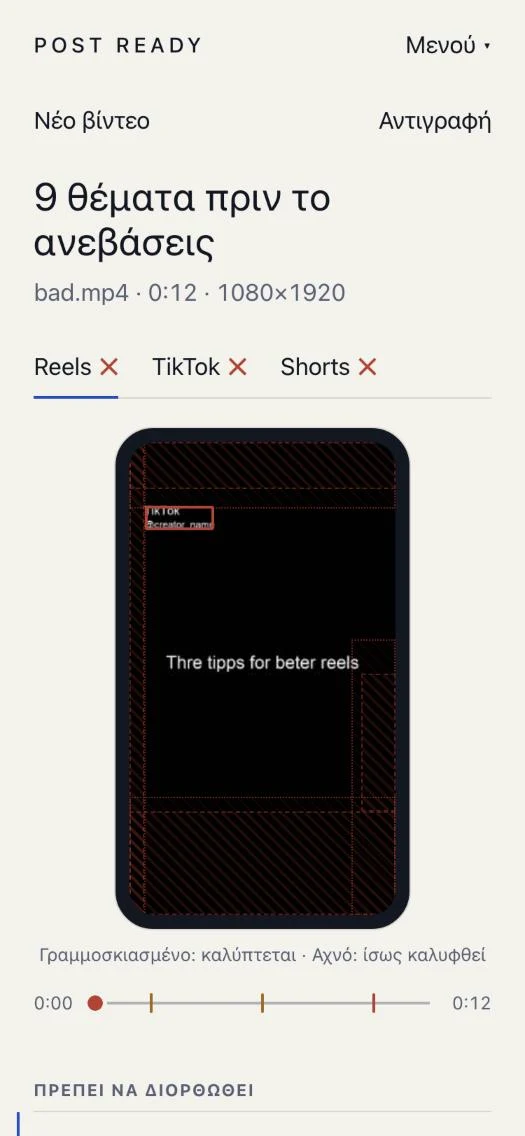
The Post Metras report on a phone: three tabs for Reels, TikTok and Shorts, a phone preview with hatched safe zones and a timeline with issue markers.
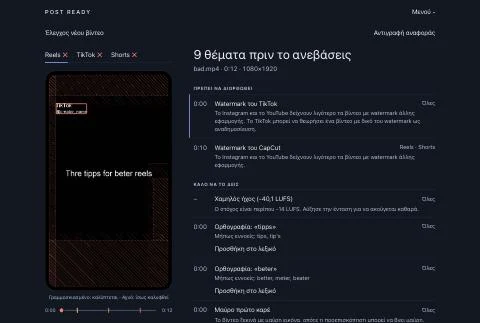
The Post Metras report on a computer, in a dark theme.
The app’s real report

Privacy

Your video stays on your device.

There is no server that receives it. The analysis runs inside your browser.

  • The video doesn’t leave

    Not the video, not the file name, not the text read from it.

  • Only language packs download

    When you ask for a language, its files download. That is all the network the check needs.

  • No account, no tracking

    No sign-up, analytics, cookies or ads.

If you activate Pro in the web version, the license key and a device name are sent to Lemon Squeezy to be checked. The video is never sent.

Read the privacy policy

Who it is for

For anyone who posts video and wants no surprises.

  • 01

    Content creators

    You post often and on your own. A check before you post catches the mistake that can’t be fixed later.

  • 02

    Editors

    You deliver the file together with a check report, and you check the whole batch together instead of one by one.

  • 03

    Agencies and brands

    The same rules for every video: safe zones, watermarks, ad disclosure. Fewer emails saying “fix it and send it again”.

  • 04

    UGC creators

    The brand gave a brief: brand name in the first seconds, specific hashtags, a length range. You check them before you deliver.

Pricing

Start free. Pro is paid once.

No subscription.

Free

0€forever

  • Videos up to 90 seconds
  • Quick check
  • All the core checks: safe zones, spelling, readability, watermarks, audio, size, caption
  • Report as an image with a small Post Metras mark
  • Paper, Studio and High contrast themes
  • Works without internet
Try it free

Pro

Price: coming soonone-time purchase

Everything in Free, plus:

  • Videos up to 15 minutes
  • Full check, every half second
  • Many videos at once
  • Sponsor deliverables
  • Report with your own brand
  • Pro themes: Charcoal and gold, Champagne, Midnight, Mint
Soon

The price will be announced before the first sale. You buy through Lemon Squeezy in the web version and through the store in the apps.

Frequently asked questions

Frequently asked questions

Is my video uploaded anywhere?

No. The analysis runs in your browser and the video is not sent anywhere. Neither the file name nor the text read from it leaves your device.

Do I need to sign up or have an account?

No. You open the page and check. There are no accounts, analytics, cookies or ads.

Does it work without internet?

Yes, after the first time. The first time, the app and text recognition load and are stored on your device. English is built in. Every other language needs one download and then works offline.

Which languages does it check spelling in?

Eighteen: English, Greek, Spanish, Portuguese, French, German, Italian, Dutch, Polish, Romanian, Czech, Hungarian, Swedish, Turkish, Ukrainian, Indonesian, Danish and Norwegian. Text is read in 19 languages; Finnish has no spelling check.

Which devices and browsers does it work on?

Modern browsers, on computers and phones. The audio and video are read by the browser itself, so some files with an unusual codec may not open. If the browser can’t read the audio, Post Metras says so and carries on with the other checks. Apps for iOS and Android are coming.

How accurate is the check?

It is an aid, not a guarantee. Text is read with image recognition, which can miss or misread a word. The apps’ safe zones are based on published dimensions, and apps change their layout. That is why there are two levels: “covered” and “may be covered”.

What does Pro add?

Videos up to 15 minutes instead of 90 seconds, a full check every half second, checking many videos at once, sponsor deliverables, a report with your own brand and four extra appearance themes. It is a one-time purchase, with no subscription.

Is Post Metras connected to Instagram, TikTok or YouTube?

No. It is an independent app. It is not affiliated with, or endorsed by, Instagram, TikTok, YouTube or CapCut. It doesn’t post anything to your accounts.

What about refunds?

You buy Pro through Lemon Squeezy in the web version, or through the App Store and Google Play in the apps. Refunds are handled by the seller or the store, under their terms.

Does it replace legal advice on advertising?

No. The reminder for #ad and #sponsored is based on simple rules applied to the caption. Disclosure obligations depend on your country and on your agreement, and the final responsibility is yours.

Your next video, checked.

Open Post Metras in your browser and check a video now.

  • Available on theApp StoreSoon
  • Available onGoogle PlaySoon